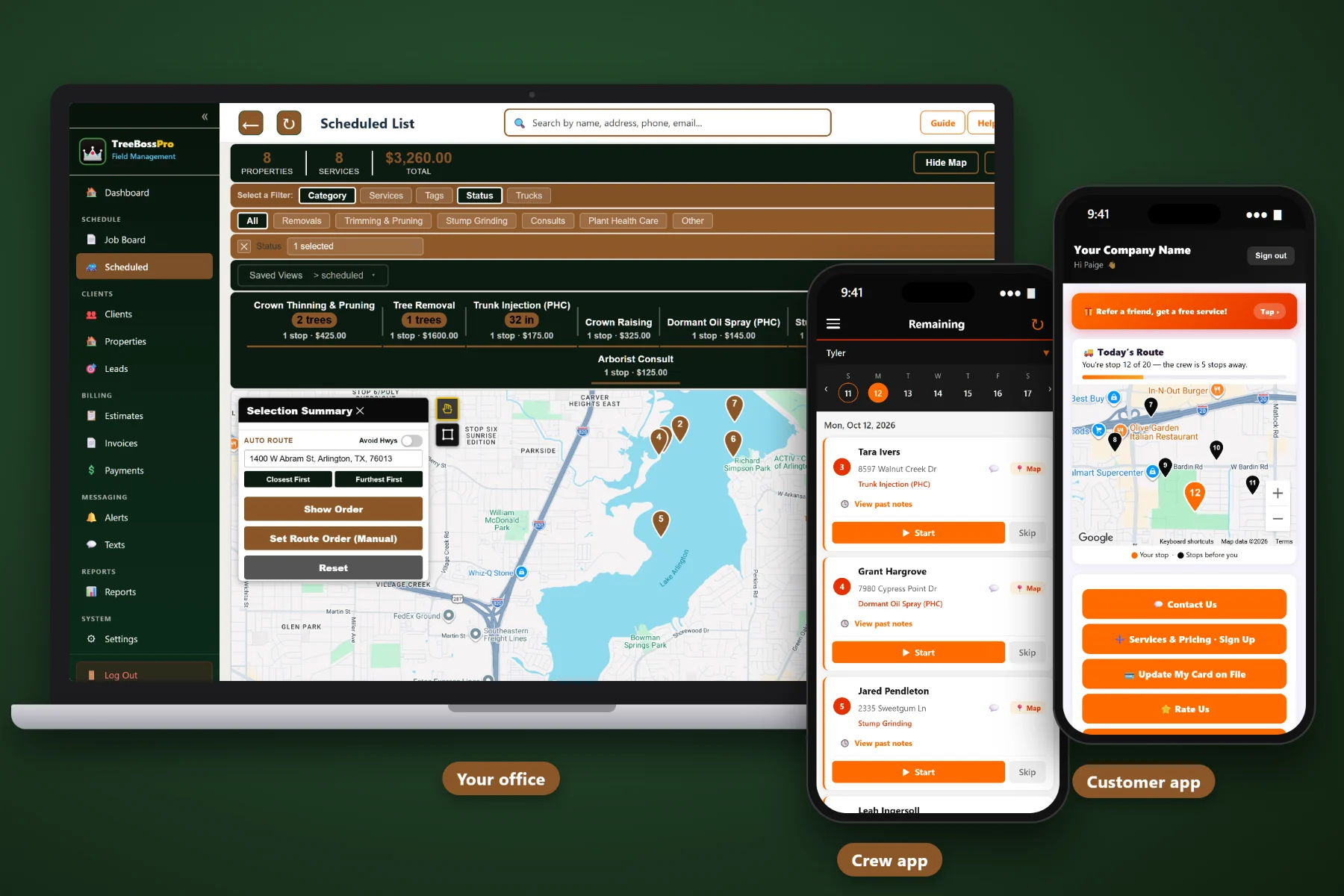
Tree work does not fit a generic appointment calendar. A removal depends on the trunk diameter, the height, the drop zone and whether the chipper fits through the gate, and every week gets interrupted by wind, rain or a tree on somebody's garage. TreeBossPro is scheduling software built around the job board, the scheduled list, recurring pruning cycles, stump grinding follow-ups and the crews that do the work.
Plans start at $59/month, and what you get is built for the way tree companies really run — a job board and scheduled list for every crew, recurring jobs for pruning cycles and PHC programs, stump grinding follow-ups that never get lost, and property records that tell the crew the DBH, height and drop zone before the truck leaves the yard. Never billed per user.
See every removal, pruning job, stump grind and PHC visit by crew and category, then read the same work in date order on the scheduled list. The whole office looks at one plan.
Book removals with DBH, height and access notes attached, group pruning by area, and create the stump grinding follow-up as its own job the moment the removal is scheduled.
Set the next pruning visit or PHC program on the property when you close out the job. Automated reminders bring the customer back to you, not to whoever knocks on the door first.
Number of trees, trunk diameter (DBH), tree height, crew notes, gate codes, drop zones, custom fields, tags and photos live on every property, so jobs get sized before they get a date.
Reminders before the visit, one-tap on-the-way and arrival alerts from the crew app, and two-way texting for everything else. Fewer "when are you coming?" calls to the office.
Crews see their job list, route, notes and gate codes, start and complete jobs, and take photos that attach to the job and the property record.
The job board is where the plan meets the real day. Each job carries its category, so a full-day rigging removal never gets mistaken for a quick stump grind. When the wind picks up, a climber calls in sick or a storm call lands at 9 a.m., the office has every crew's day in front of it and can move the right job.
A scheduling system only works if the office and the crews actually use it. TreeBossPro keeps each screen focused on the job in front of you, so a new scheduler or a crew leader who hates phones can be productive on day one.
Import clients and properties by CSV, then add what you know: number of trees, DBH, height, gate codes and drop zones. Records do not need to be perfect on day one. They get better every time a crew adds a note or a photo.
Every removal, prune, stump grind, PHC visit, storm call and consult goes on the job board with its category. For the first time you can see your real backlog in one place and schedule it by area instead of by the order the phone rang.
Give each job a date and a crew, and it lands on the scheduled list and in that crew's app, ordered by auto-routing. No reading addresses over the phone, no whiteboard only one person can decipher.
Turn on appointment reminders and alerts, set recurring jobs for pruning cycles and PHC programs, and connect invoicing and card on file. From there the follow-up work happens on its own while your crews keep cutting.
A tree job is not just an appointment. It is a crew with a climber and a chipper, a drop zone somebody has to plan, a stump that needs a second visit, and a customer who needs to move the car before you arrive.
A calendar app does not know that a 36-inch oak leaning over a roof takes a full day with rigging while a 10-inch maple in an open yard takes an hour. It does not remind you to book the stump grind, bring a pruning customer back on their cycle, or text the homeowner when your crew is on the way.
So the real schedule ends up on a whiteboard, a stack of sticky notes and the owner's memory. That works until a storm drops thirty calls in one morning, the wind shuts down climbing for two days, or the one person who knows every gate code takes a day off. TreeBossPro puts all of it in one system the whole office and every crew can see.
To see how the pieces fit together — the job board, removals, pruning cycles, stump grinding, storms and weather — start with Tree Service Scheduling Software: The Complete Guide for Tree Care Companies.
Every tool here is aimed at the way tree companies book, schedule and bill — from the first phone call to the payment.
See every job by crew and category on the board, and in date order on the scheduled list. Move jobs between crews and days without losing notes.
Size removals with number of trees, DBH and height before they get a date, so a rigging job never gets squeezed into half a day.
Group pruning jobs by area on the route map and use flexible pruning work to fill the gaps around larger jobs.
Create the grind as its own job when the removal is booked, then batch grinds by area so the grinder runs full days.
Set pruning cycles and plant health care programs as recurring jobs on the property, with automated reminders when they come due.
Storm & Emergency jobs get their own category, so you can see how many hazards are waiting and where, and triage the backlog by area.
Move a job to a new date with a note on why. Crew notes, photos and gate codes stay attached, and the customer's reminder follows the new date.
See every job on a map, group work by area and let auto-routing put each crew's stops in a sensible driving order.
Assign jobs to crews by skill and equipment, use tags like climber needed, and see at a glance which crews are full.
Reminders by text and email, one-tap on-the-way and arrival alerts from the crew app, and two-way texting with every reply on the customer record.
Job list, route, notes, gate codes, start and complete, and photos that attach to the job and the property.
Send estimates customers approve online, with automatic follow-up. Approved work goes straight onto the board.
Invoice from the completed job, charge a card on file, take prepayments and auto-bill recurring pruning and PHC.
Review completed jobs by category, open estimates and billing each week to see whether the backlog is growing.
Add climbers, ground crew and office staff without per-seat charges. The Crew plan includes unlimited users.
Most customers forget about their trees until a limb comes down, then call whoever shows up first in a search. Recurring jobs change that. Set the next pruning cycle or PHC program when you close out the job, and automated reminders go to the customer when it comes due. Over a few seasons that becomes a steady base of repeat work you can plan crews around. For the full picture of how recurring work fits into daily scheduling, read Tree Service Scheduling Software: The Complete Guide for Tree Care Companies.
Assign a job and it lands in the crew's app with the property details attached. They see the number of trees, DBH, height, crew notes and the gate code, tap on-the-way so the customer moves the car, do the work, take photos and mark it complete. The office sees the board update without a phone call.
Pick the plan that fits your company today. Every plan starts with a 14-day free trial, no credit card required.
14-day free trial. No credit card required. Never billed per user.
Practical guides on the job board, removals, pruning cycles, stump grinding, storms, weather, crews and customer texts — written for tree service companies.
Yes. TreeBossPro is scheduling software built around tree work: a job board and scheduled list, recurring jobs for pruning cycles and PHC programs, property records with number of trees, DBH, height, crew notes, gate codes and drop zones, and job categories for Removals, Trimming & Pruning, Stump Grinding, Plant Health Care, Storm & Emergency and Consults.
Create the grind as its own Stump Grinding job on the property when you schedule the removal. It shows on the job board in its own category, can be assigned to whoever runs the grinder, and can be batched with other grinds in the same area on the route map.
When you finish a job, set a recurring job for the next pruning visit or PHC program on the property. When it comes due, an automated reminder goes to the customer by text or email, and the job goes onto the board for a date and crew.
Move jobs to a new date on the board. Crew notes, photos and gate codes stay attached, and the customer's reminder follows the new date. Storm calls go in as Storm & Emergency jobs so you can see the whole backlog and work it by area.
Yes. Assign each job to a crew, and every crew sees its own job list, route and notes in the crew app. TreeBossPro is never billed per user, and the Crew plan includes unlimited users.
Start is $59/mo, Pro is $89/mo and Crew is $199/mo with unlimited users. Every plan starts with a 14-day free trial, no credit card required.
TreeBossPro schedules, routes, reminds and bills your entire tree service from one platform — see the full platform overview.
Put your job board, removals, pruning cycles, stump grinding follow-ups and crew app in one place. Try TreeBossPro free for 14 days.