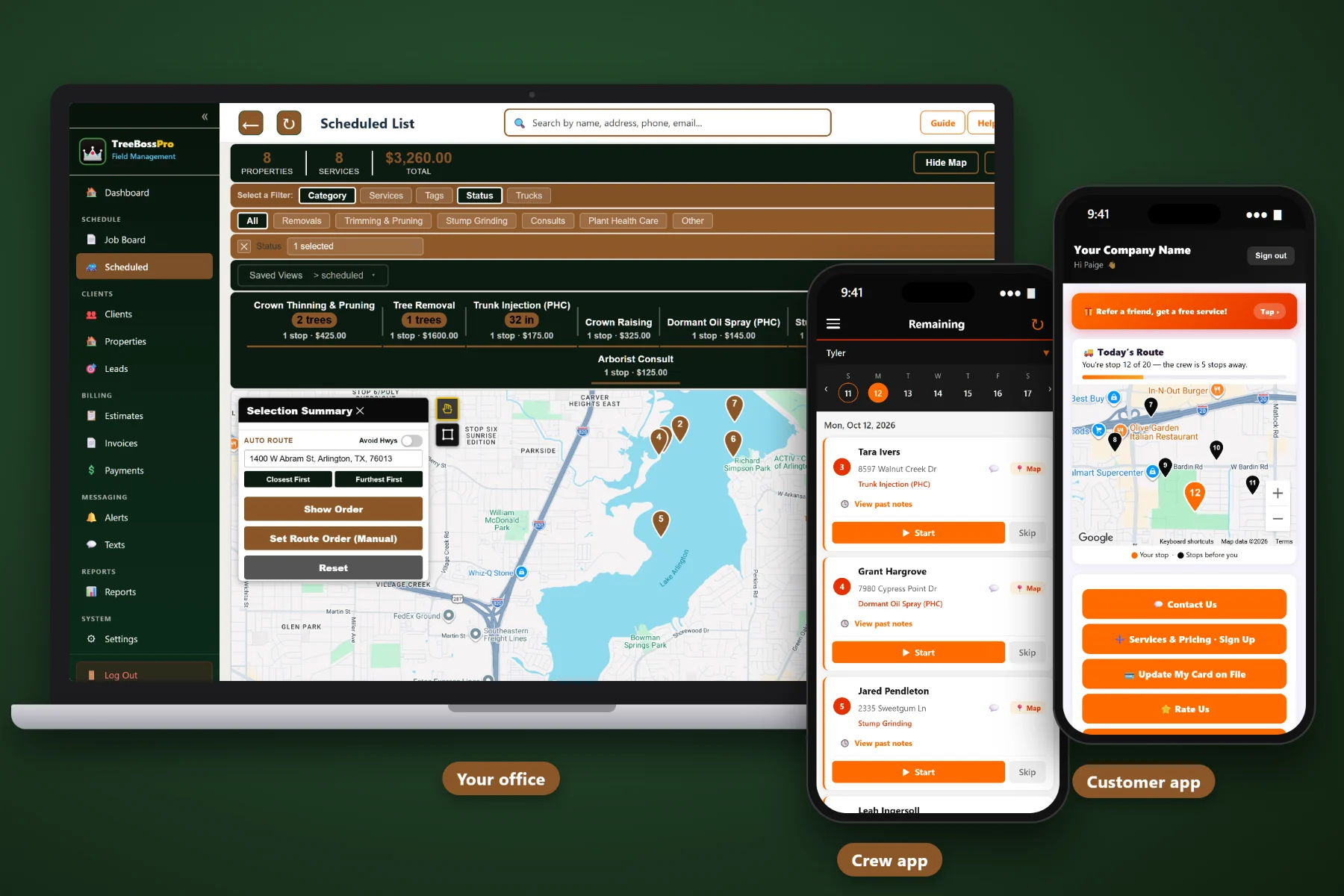
A tree service day is not one van running one list. The climbing crew has two big removals, the stump grinder is working through last week's stumps, the PHC tech has a string of short stops, and the estimator is out on consults. TreeBossPro puts every job on one board, assigns it to the right crew, lays each route out on the map, and hands every crew their stops, gate codes, and drop zones in the crew app before the trucks leave the yard.
Plans start at $59/month and you are never billed per user, so every climber, groundie, grinder operator, and PHC tech can have the crew app. The job board, route map, auto-routing, and customer alerts are part of the platform, not an add-on you discover after signing. To see how dispatch fits with estimates, records, and billing, start at TreeBossPro and then dig into crew routing here.
Every scheduled job pinned on the map. Let auto-routing put each crew's stops in order, then move the big removal to first thing yourself.
The climbing crew, the stump grinder, the PHC tech, and the estimator each get their own jobs and their own route.
Number of trees, trunk diameter (DBH), and tree height on the property, so you can size the job before you put it on a route.
One board for the day. Assign jobs to crews, slide work when a storm call comes in, and keep every job on a real date.
Job list, route, notes, gate codes, drop zones, start and complete, and photos that land on the property record.
One tap from the crew sends the alert, customers choose which ones they get, and the live crew map shows where you are on service day.
The estimator walked the property and figured out where the wood comes down, how the chipper gets close, and which gate the grinder fits through. TreeBossPro keeps that on the property record and puts it in the crew app with the job, so the climber reads the plan on the drive over instead of calling the office from the driveway.
You do not need a logistics department to route three tree crews and a grinder. TreeBossPro keeps the job, the crew, the tree details, and the customer together, so the person answering the phone can build tomorrow's board without a training course.
Import clients with CSV, then add the tree count, DBH, height, access notes, gate codes, and drop zones that every dispatch decision depends on.
Work the job board: Removals and Trimming & Pruning to the climbing crew, Stump Grinding to the grinder, Plant Health Care to the PHC tech, Consults to the estimator.
See each crew's stops pinned on the route map, let auto-routing put them in order, and adjust for the big removal or the customer who asked for after 10.
Each crew sees its stops, notes, and gate codes, sends on-the-way and arrival alerts, takes photos, and marks each job complete.
Most scheduling tools assume one tech, one van, and a string of similar jobs. A tree company runs a climbing crew on two all-day removals, a grinder on ten short stops, and a PHC tech on a program route, all on the same day. A route that ignores that is a route your crew lead rewrites in the yard.
Ask any tree service dispatcher how the day really gets built and you will hear the same story: a whiteboard in the shop, a stack of work orders, and a group text at 9pm. Which oak is 34 inches and 70 feet tall. Which side gate the grinder fits through. Where the estimator promised the wood would come down. Which customer needs the driveway back by noon.
That knowledge belongs in the system, not in one person's head or phone. When it lives on the property record and shows up in the crew app, anyone in the office can build the board and any crew can run the job.
TreeBossPro keeps the job, the crew, the route, and the property details in one place, from the first call to the paid invoice.
Every tool here exists to get crews through a full day with less driving, fewer phone calls, and no surprises at the gate.
See every scheduled job pinned on the map and each crew's day laid out as a route.
Let the software put a crew's stops in a sensible order, then override it where your judgment says otherwise.
One board for the whole day. Assign jobs to crews and move them when a storm call or a sick climber changes the plan.
Climbing crews, the stump grinder, the PHC tech, and the estimator each get their own jobs and their own route.
Removals, Trimming & Pruning, Stump Grinding, Plant Health Care, Storm & Emergency, and Consults, so every crew's day reads at a glance.
Pruning cycles and PHC programs come back around on schedule, ready to route by area.
Number of trees, trunk diameter (DBH, inches), and tree height (ft) on every property, the numbers that decide how long a stop takes.
Crew notes for access, gate codes, and drop zones, shown with the job in the crew app.
Job list, route, notes, gate codes, start and complete, and photos, all from the crew's phone.
Before and after photos from the crew app attach to the property for the next visit and for customer questions.
One tap from the crew sends the alert. Customers choose which alerts they receive.
On service day, customers can watch the live crew map in the customer app instead of calling the office.
Customer replies about gates, timing, and add-on work land with the office, tied to the customer.
Products with EPA reg numbers, mixes, per-service application records, applicator license numbers, and a chemical tracking report.
Turn completed jobs into invoices, charge the card on file, run auto-billing, and take online payments.
Add every climber, groundie, and tech. Plans are Start $59, Pro $89, and Crew $199 per month, not a per-seat charge.
The job board is where routes turn into a plan. Approved estimates land in the right category, go to the right crew, and get ordered on the map. When a limb comes down on a roof at 8am, you tag it Storm & Emergency, put it on the crew that can handle it, and slide the planned work to a real date instead of losing it. For a full walkthrough of crews, routes, the crew app, and customer alerts, read Tree Crew Dispatch & Routing Software: The Complete Guide for Tree Service Companies.
Half the delays on a tree route are the car over the stump, the locked gate, and the dog in the back yard. The crew taps once for on-the-way and once for arrival, customers pick the alerts they want, and on service day they can watch the live crew map in the customer app. Replies come back to the office through two-way texting, and the visit, the invoice, and online payment all sit in the customer portal afterward.
Pick the plan that fits your operation. Every plan starts with a 14-day free trial and no credit card.
Compare plans on the pricing page.
Yes. Property records carry the number of trees, trunk diameter (DBH), tree height, and crew notes for access, gate codes, and drop zones, and work is organized into Removals, Trimming & Pruning, Stump Grinding, Plant Health Care, Storm & Emergency, and Consults. Dispatch, the crew app, customer alerts, and invoicing all work from those records.
Scheduled jobs show up on the job board and the route map. You assign them to crews, and auto-routing puts each crew's stops in order. You can change the order whenever the big removal should go first or a customer asked for a certain time.
Yes. Each crew gets its own jobs and its own route, so the grinder's ten short stops and the climbing crew's two removals are planned on their own terms, all from one board.
Their job list, the route, property notes, gate codes, and drop zones. They tap start and complete, take photos that attach to the property, and send one-tap on-the-way and arrival alerts.
Yes. Customers choose which alerts they receive, including on-the-way and arrival, and on service day they can watch the live crew map in the customer app. Two-way texting brings their replies back to the office.
Start is $59/month, Pro is $89/month, and Crew is $199/month. You are never billed per user, and every plan starts with a 14-day free trial with no credit card.
Dispatch and routing are one piece of how TreeBossPro runs a tree service. For estimates, records, PHC, and billing, see the full platform overview.
Practical reading on crew dispatch, route maps, stump grinding and PHC routes, the crew app, and service-day customer alerts.
Job board, route map, auto-routing, the crew app, and customer alerts in one place. Try TreeBossPro free for 14 days.