A contact list holds a name and a phone number. TreeBossPro holds the property — tree count, DBH, height, site notes, photos and every visit you have made — then turns your consult recommendations into estimates, pruning cycles and plant health care programs.
An arborist's value is in reading the trees and giving honest advice. The estimate, the follow-up, the crew handoff, the next pruning cycle and the invoice are administration. TreeBossPro keeps what you learn on the property record and turns it into scheduled work. New here? Start with Arborist Software: The Complete Guide for Consulting Arborists and Tree Care Practices.
Number of trees, trunk diameter (DBH, inches) and tree height (ft) on every property, plus custom fields and tags for anything else your practice tracks.
Book consults as their own job category, see the property history before you arrive and capture notes and photos on site.
Turn recommendations into estimates clients approve online, with automatic follow-up on the ones that go quiet. Approved work moves straight to the schedule.
Set pruning cycles and plant health care programs as recurring jobs on the property, so next season's care is on the books today.
Products with EPA registration numbers, mixes, per-service application records and applicator license numbers, with a chemical tracking report.
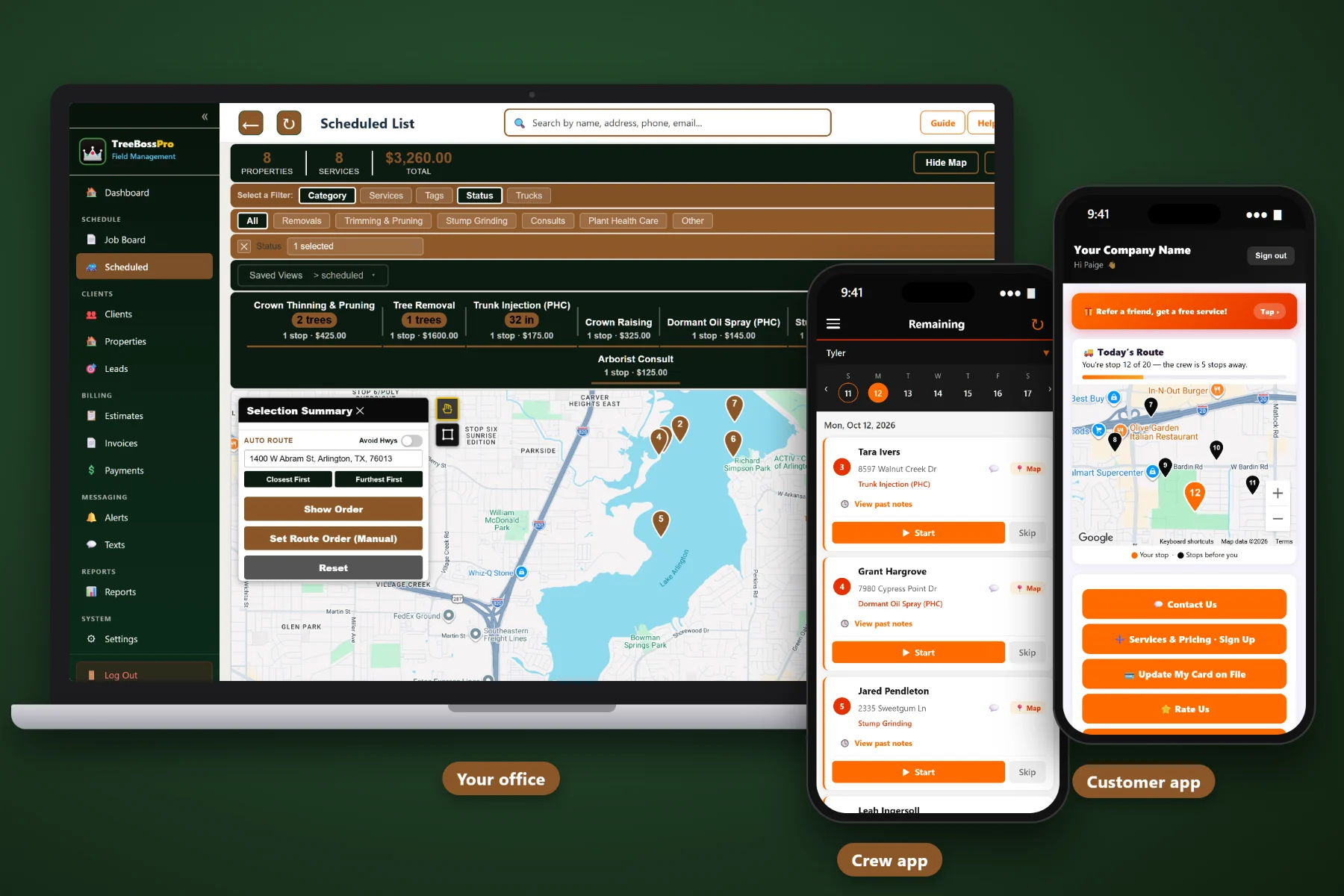
Crews see notes, gate codes and routes and add photos. Clients see visits, pay invoices online and watch a live crew map on service day.
Trees don't move when owners do. TreeBossPro builds records around the property, so the tree count, the size of the significant trees, your site notes, photos and full service history stay with the address through every phone number change, staff change and home sale. Tree data is recorded per property alongside your notes and photos — TreeBossPro is not a per-tree inventory or a formal report generator.
A records system only works if the office, the arborist and the crews use it every day. TreeBossPro keeps each step short so the property record gets better with every visit instead of going stale.
Export your client list to a spreadsheet and bring it in with the CSV import. Names, phones and service addresses are enough to start booking consults and sending reminders.
Record tree count, DBH, height, site notes and photos as you consult and as crews work. Within a season, your active properties have complete records.
Close out each pruning or PHC visit by setting a recurring job at the interval you recommend. Next season’s care is on the books before the crew leaves.
Automated texts and emails reach clients before visits, crews send one-tap on-the-way alerts, and two-way texting brings replies back to the record.
Arborist work is relationship work. The same client comes back for a structural prune, a PHC program and a storm check over the years. A contact list built for sales teams was never designed to hold that story.
The consult went well. You pointed out the included bark, explained the end weight over the driveway and recommended a reduction. Then the estimate went out a week late — and by the time it arrived, the client had stopped thinking about the tree.
Meanwhile the details that make the next visit right — the size of the oak, how much was taken off last cycle, the narrow side gate, the drop zone — live in one arborist's head. When the crew shows up, the handoff is a job title that says "trim maple."
TreeBossPro puts all of it on the property record, sends the estimate for online approval, schedules the next cycle and keeps the client informed for you.
Every tool connects back to the same property record, so what you learn on a consult shows up in the estimate, on the crew app and for the client.
One client, as many properties as they own. Estates, landlords and property managers stay under one relationship while each address keeps its own record.
Record the number of trees, trunk diameter in inches and tree height in feet on every property, so estimates and crews start from real numbers.
Access, gate codes, drop zones and targets written once on the property and shown to the crew on every job.
Track primary species, cabling installed, wood preferences or anything else your practice needs on each property.
Tag clients and properties by program, follow-up needed, account type or zone, then pull the list when it is time to act.
Every visit stays on the property: consults, pruning, PHC applications and storm work, even after the home sells.
Photos of defects, before and after shots and canopy condition attach to the property record from the crew app.
Book consults as their own job category alongside Removals, Trimming & Pruning, Stump Grinding, Plant Health Care and Storm & Emergency.
Every inquiry becomes a lead with the tree, the concern and the timeline, so no caller lives on a sticky note.
Send tiered recommendations as estimates. Clients approve online, automatic follow-up chases the quiet ones, and approved work moves to the schedule.
Pruning cycles and PHC programs live on the property at the interval you recommend, so future care is already scheduled.
Products with EPA registration numbers, mixes, application records with product, rate and amount, applicator license numbers and a chemical tracking report.
Let clients know what was applied and any precautions after each plant health care visit.
See the scheduled list on a route map and auto-route consult days and PHC routes to cut windshield time.
Job list, route, notes and gate codes, start and complete jobs, add photos and send one-tap on-the-way and arrival alerts.
Visit reminders and service messages go out automatically, whether the office is slammed or closed for the weekend.
Client replies, questions and storm-damage photos land in TreeBossPro next to their record, visible to the whole office.
Clients see visits, view and pay invoices, keep a card on file, choose their alerts and watch a live crew map on service day.
Invoice consults and care visits, keep cards on file, auto-bill recurring work, take prepayments and apply sales tax.
See work by category, invoiced versus paid, recurring care and chemical tracking across your practice.
Add every arborist, office staffer and crew member without your bill climbing. Records only work when the whole team can use them.
Recurring jobs put every property's next structural prune, maintenance cycle or PHC visit on the schedule at the interval you recommend. Automated texts and emails let the client know, two-way texting brings their reply back to the record, and chemical tracking records every application. For the full walkthrough, read Arborist Software: The Complete Guide for Consulting Arborists and Tree Care Practices.
A new inquiry becomes a lead. A lead becomes a client with a property and a booked consult. Your recommendations become an estimate the client approves online. Approved work goes to the crew with your notes and photos, and the next cycle goes on the schedule. Between visits, clients have their own app and portal instead of only your phone number.
Add your arborists, office staff and every crew member without your bill climbing. Every plan starts with a 14-day free trial and no credit card.
Compare everything included on each plan on the pricing page.
Practical guides on consults, tree records, estimates, pruning cycles, plant health care, client communication and running a practice alongside crews.
Each property record holds the number of trees, trunk diameter (DBH) in inches and tree height in feet, plus crew notes for access, gate codes and drop zones, custom fields, tags, the full service history and photos from the crew app. Tree data is recorded per property, not as a per-tree inventory.
No. TreeBossPro keeps your property data, notes, photos and service history, which make good source material, but it does not generate formal arborist reports or risk assessment forms. Prepare those in your own report format.
Book consults as their own job category, then send your recommendations as an estimate from the property record. Clients approve online, automatic follow-up reminds the ones who have not answered, and approved work moves to the schedule.
Yes. Set them as recurring jobs on each property. For plant health care, chemical tracking records products with EPA registration numbers, mixes, application records with product, rate and amount, and applicator license numbers. Record-keeping requirements vary by location, so check your local rules.
Yes. Clients get a customer app and portal to see visits, view and pay invoices online, keep a card on file, choose which alerts they receive and watch a live crew map on service day.
Plans are Start at $59/month, Pro at $89/month and Crew at $199/month. You are never billed per user, and every plan starts with a 14-day free trial with no credit card required.
Arborist tools are one part of TreeBossPro, alongside scheduling, routing, the crew app and invoicing. See the full platform overview.
Put every property on record, turn consults into approved work and keep recurring care on the schedule with TreeBossPro. Try it free for 14 days.