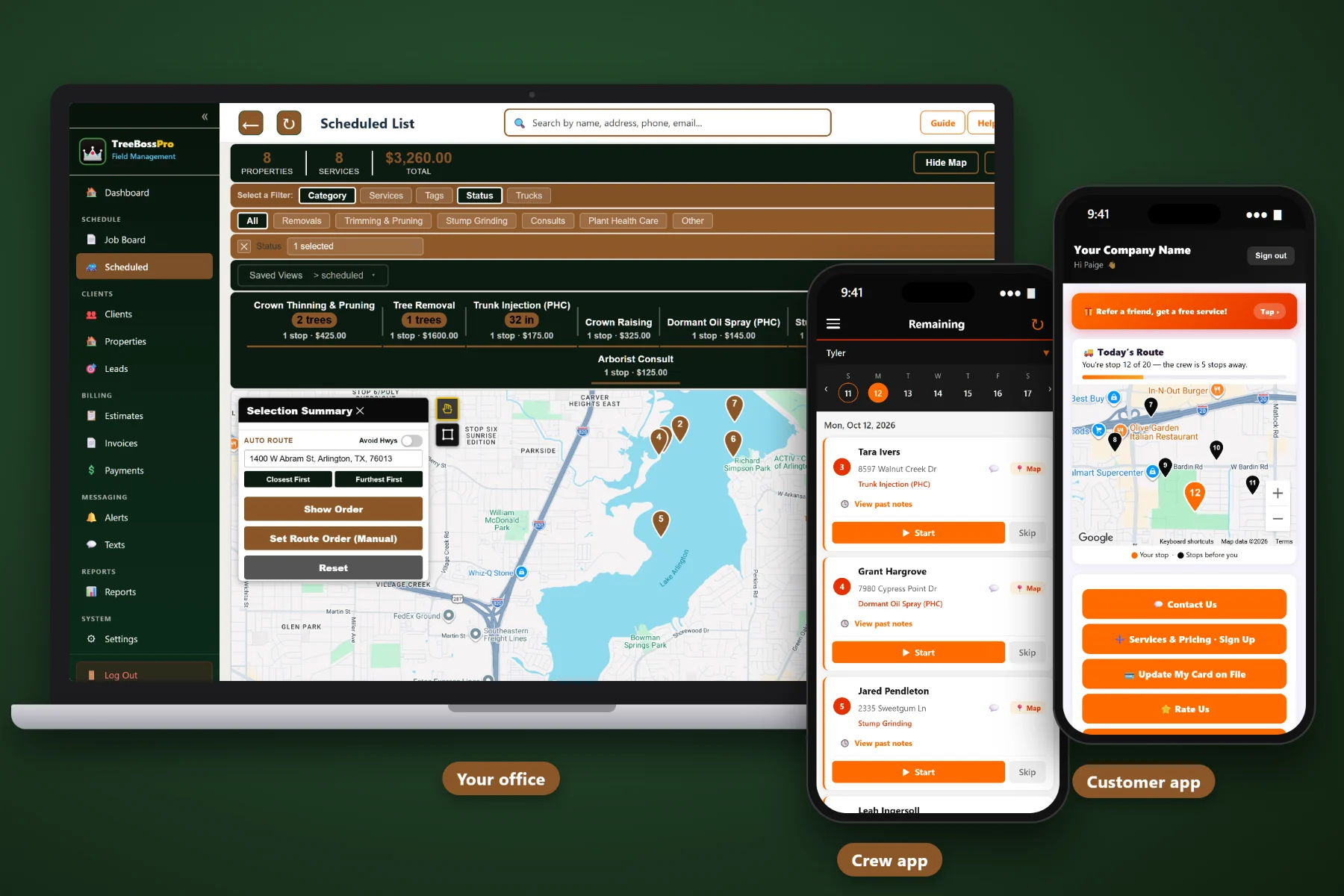
Dropping the tree is the part your crew is good at. The phone tag, the estimate nobody followed up on, the whiteboard that got erased, the gate code on a sticky note and the invoice that went out two weeks late are what eat your margin. TreeBossPro runs the whole company in one system — from the first call to paid.
Plans start at $59/month, but TreeBossPro is not a contact list with a calendar bolted on. It knows how many trees are on the property, how big they are, where the drop zone is, which crew is going where and what the customer still owes — and you are never billed per user, so adding a groundie never adds to the bill.
Every client can have several properties, and every property carries the number of trees, trunk diameter (DBH), tree height, crew notes, tags, photos and full service history.
Leads become estimates the customer approves online. Automatic follow-up chases the ones that go quiet, so a good removal bid doesn't die in someone's inbox.
See every crew's day on the job board and the scheduled list, check it on the route map, and let auto-routing put the stops in a sensible order.
Climbers and groundies see the job list, route, notes and gate codes, tap start and complete, take photos and send on-the-way alerts with one tap.
Automated texts and emails, two-way texting, and a customer app where clients see visits, pay invoices and watch the crew map on service day.
Completed jobs turn into invoices. Store a card on file, auto-bill recurring work, take prepayments and online payments, with sales tax handled on the invoice.
This is the heart of TreeBossPro. The call becomes a lead, the lead becomes an estimate the customer approves online, the approved estimate becomes a job on the board, the crew works it from the app, and the finished job becomes an invoice that can be paid online or charged to the card on file. Nothing gets re-typed, and nothing lives on a whiteboard. For the full walkthrough, read Tree Service Software: The Complete Guide for Tree Companies.
Most field service software is built for plumbers and HVAC, and tree work gets squeezed into fields that don't fit. TreeBossPro is built around properties, trees, crews and the way a tree job actually runs. Bring in your customers, add your crews, and you can run tomorrow's schedule from it.
Bring your customer list in by CSV, then add tree counts, DBH, heights and crew notes as you go. You can be scheduling real jobs the same day you sign up.
The job board and scheduled list show every crew and every job. Removals, Trimming & Pruning, Stump Grinding, Plant Health Care, Storm & Emergency and Consults are easy to tell apart.
The crew reads the notes and gate code, takes before and after photos and taps complete. No clipboard, no end-of-day paperwork, and no calls asking which house is next.
Estimates chase themselves, recurring jobs bring pruning cycles and PHC programs back around, and automated texts handle reminders and on-the-way notices.
Tree work has more moving parts than most trades. A single removal can involve a site visit, an estimate, a scheduled crew, a stump grinding follow-up, a cleanup and an invoice — and every one of those steps is a chance for something to fall through.
Most tree companies run on a notebook in the truck, a whiteboard in the shop and a spreadsheet nobody trusts. It works until a storm doubles the phone calls, until the estimate for a big oak removal never gets a follow-up, until the stump grinding nobody wrote down turns into an angry customer, or until the one person who knew every gate code is out sick. Generic software doesn't help, because it has no place for tree counts, DBH, heights, drop zones or plant health care records.
TreeBossPro does. Tree details sit on the property, crews sit on the job board, estimates follow up on their own, and every finished job turns into an invoice. It's built around the way a tree service actually runs.
This page covers the hub — how all the pieces connect. To see each piece in more depth, explore the full TreeBossPro platform.
Every tool in TreeBossPro was built with tree work in mind — not adapted from a generic service app and called good enough.
One client, several addresses: the home, the rental, the lake lot. Each property keeps its own trees, notes, history and photos.
Record the number of trees, trunk diameter in inches and height in feet on every property, so the next estimate starts with real numbers.
Access, gate codes, dogs, overhead lines to watch for and where the drop zone is. The crew reads it before they pull up, not after.
Add the fields your company cares about and tag properties and clients so you can find them again — HOA, commercial, PHC program, storm list.
Every call, web lead and referral becomes a lead with an owner, so nobody has to remember who was supposed to call back about the leaning pine.
Send the estimate, let the customer approve it from their phone, and let automatic follow-up nudge the ones who go quiet.
Removals, Trimming & Pruning, Stump Grinding, Plant Health Care, Storm & Emergency and Consults each get their own category on the board.
See what every crew has today and this week, move jobs between crews when a day changes, and keep the list honest.
See the day on a map and let auto-routing order the stops so the chipper truck isn't crossing town twice.
Pruning cycles and PHC programs recur on their own schedule, so next season's work is on the books before this season ends.
Job list, route, notes, gate codes, start and complete, photos, and one-tap on-the-way and arrival alerts.
Before and after photos from the crew app stay with the property and its service history — proof for disputes and a head start on the next estimate.
Products with EPA registration numbers, mixes, and per-service application records with product, rate, amount and applicator license number.
Pull a chemical tracking report from your application records, and send customers chemical instruction emails after a treatment.
Reminders, on-the-way notices and completed messages go out automatically, and two-way texting keeps every conversation with the customer in one thread.
Clients see their visits and invoices, pay online, keep a card on file, choose their alerts and watch the live crew map on service day.
Completed jobs become invoices with the right client, property and line items, with sales tax applied.
Store a card for recurring pruning and PHC customers and bill them automatically. Take prepayments for big removals.
Customers pay invoices online instead of mailing a check, and every payment is tied to the job it came from.
See jobs completed, revenue, unpaid invoices and upcoming recurring work so you know how each crew and each week is really doing.
Bring your customer list over from a spreadsheet or your old system instead of typing it in one name at a time.
Add climbers, groundies and office staff without a per-seat bill. The Crew plan includes unlimited users.
Try it with your own customers, properties and crews for 14 days. No credit card required to start.
A homeowner who calls you for one dead tree usually has a yard full of trees that will need you again. TreeBossPro recurring jobs let you put pruning cycles and plant health care programs on the books the day you finish the first job, and automated reminders bring the customer back on schedule instead of whenever they remember your number. Learn how in Recurring Pruning Cycles That Keep Tree Customers Coming Back.
The crew reads the notes, finds the drop zone, takes the tree down and shoots before and after photos. One tap marks it complete. The customer gets a completed message, the invoice is built from the job, and recurring or program customers are charged to the card on file. If the crew spotted a cracked leader or a declining tree next door, an estimate with online approval goes out the same day.
Pick the plan that fits your operation. Adding a climber, a groundie or an office helper never adds a per-seat charge, and every plan starts with a 14-day free trial.
No credit card required. 14-day free trial. Never billed per user.
Every property record holds the number of trees, trunk diameter (DBH) in inches, tree height in feet, crew notes for access, gate codes and drop zones, custom fields, tags, photos from the crew app and the full service history. A client can have as many properties as they need.
Yes. Leads turn into estimates the customer can approve online, and automatic follow-up reminds customers who haven't answered. Approved estimates become jobs you can schedule on the job board.
You assign jobs to crews on the job board and scheduled list. The route map shows the day, auto-routing orders the stops, and the crew mobile app gives each crew its job list, notes, gate codes and one-tap alerts.
Yes. PHC programs can run as recurring jobs, and chemical tracking stores your products with EPA registration numbers, mixes, per-service application records with product, rate and amount, and applicator license numbers. Record-keeping rules vary by state, so check what yours requires.
Yes. Completed jobs become invoices with sales tax, customers can pay online through the customer app, you can store a card on file, auto-bill recurring work and take prepayments.
Start is $59/month, Pro is $89/month and Crew is $199/month with unlimited users. You are never billed per user. Every plan starts with a 14-day free trial and no credit card is required.
Removals, pruning, stump grinding, plant health care, storm work and consults all run from the same platform. See the full TreeBossPro overview.
Practical guides on running a tree company from one system: property records, estimates, scheduling, crews, plant health care, customer texts and getting paid. Start with Tree Service Software: The Complete Guide for Tree Companies.
TreeBossPro keeps every customer, property, estimate, crew and invoice in one place, so your crews cut more and your office chases less. Try it free for 14 days.